Please do not close this tab. It's used to record your audio for MAIA's voice feature.
Test Audio Granting this site access to your microphone Troubleshooting Voice/Audio Recording Why give this site access to my microphone? Microphone not working? Contact us
Test Audio
Click here to test if your microphone is set up to work with MAIA
Granting this site access to your microphone
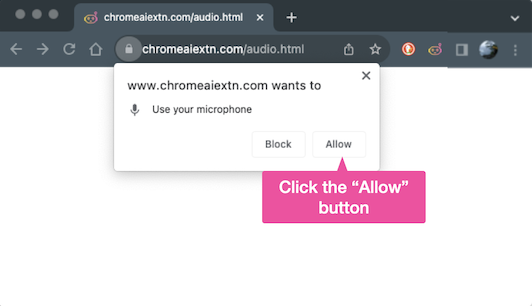
Please grant this site access to your microphone
In case you closed the pop up shown below, just reload the screen and then click on the "Allow"
button.
Why should I give this site access to my microphone?
Troubleshooting Voice/Audio Recording
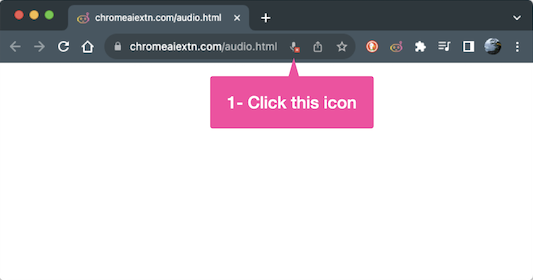
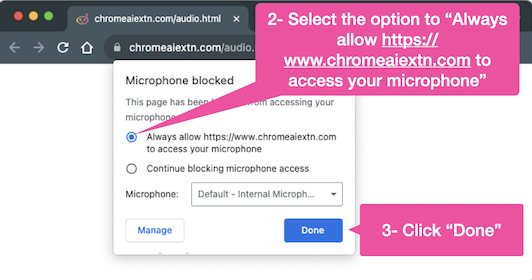
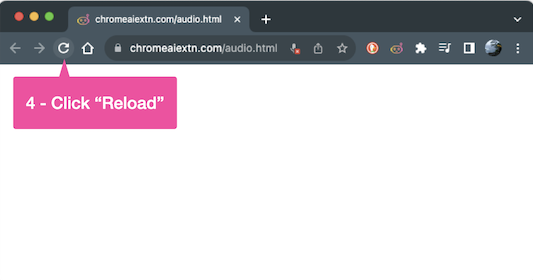
Please follow these steps to ensure that you can use MAIA's voice feature.
Back to top
Why give this site access to my microphone?
We're glad you asked!
There are two reasons:
- Privacy and security: MAIA takes privacy seriously - she records audio only when you request it. We do this so that no other site, you're browsing, can access your audio. Additionally, we do not store your data (including voice) on our servers.
- Technical Limitations: Google Chrome does not allow side panel extensions to capture audio.
Microphone not working?
Please refer to this article from
Google Chrome.
Back to top